

The short answer
Under the Data Privacy Act of 2012 (RA 10173) and National Privacy Commission (NPC) guidance, Philippine employers can legally use branch GPS checks, clock-in selfies, and face verification to stop buddy punching, provided you rely on the right lawful basis (employment contract necessity or legitimate interest rather than forced "consent"), pass the proportionality test, post a written workplace privacy notice before rollout, keep a short Privacy Impact Assessment (PIA) and Legitimate Interest Assessment (LIA) on file, and delete punch photos on a strict retention schedule instead of keeping them indefinitely.
On this page
4 ways buddy punching actually happens (and what stops each one)
Small Philippine businesses rarely lose payroll to elaborate hacks; they lose it to four everyday shortcuts:
| Shortcut | How it happens | What actually stops it |
|---|---|---|
| PIN or RFID card sharing | An early opener types a late co-worker's PIN or taps their RFID card. | Clock-in camera photo or face check against the employee's enrolled face photo. |
| Photo-of-a-photo spoofing | Someone holds a printed photo or smartphone screen up to a basic selfie tablet. | Active head-turn liveness (taking a second photo as the person turns their head). |
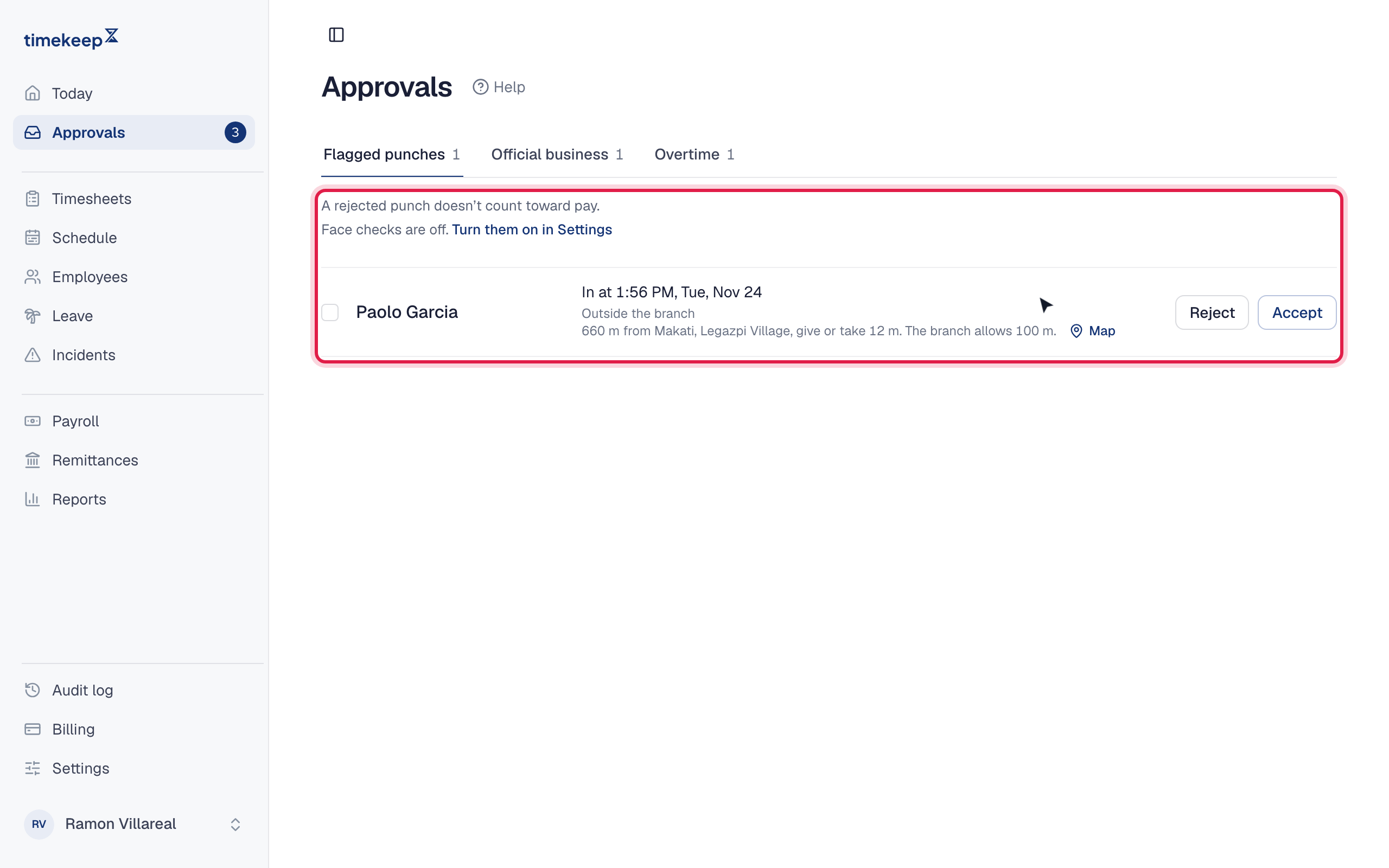
| Clocking in from home or transit | Staff tap "Clock In" on their phone from bed or a jeepney 2 km away. | Branch GPS geofencing (flagging punches outside the branch radius or with location off). |
| Device clock spoofing | Turning off automatic time on a phone to clock in at 7:55 AM when arriving at 8:20 AM. | Server-time verification that flags any device clock off by more than 5 minutes. |
What RA 10173 and the National Privacy Commission require
Four NPC issuances shape how Philippine employers should roll out attendance monitoring: NPC Circular No. 2023-04 (Guidelines on Consent), NPC Circular No. 2023-07 (Guidelines on Legitimate Interest), NPC Circular No. 2022-04 (DPO and system registration thresholds), and workplace monitoring guidance such as NPC Advisory Opinion No. 2024-003 (affirming proportionality and Section 12(b)/(f) in remote-monitoring disputes) alongside NPC Circular No. 2024-02 (CCTV transparency and retention principles, instructive by analogy).
- Rely on lawful workplace basis—not forced "consent"—and protect face photos as high-risk data: Under NPC Circular No. 2023-04, consent must be freely given; because of the employer-employee power imbalance, relying on consent alone for mandatory attendance checks is weak. For timestamps and work-location logs, employers rely on RA 10173 Section 12(b) (fulfillment of the employment contract) and Section 12(f) (legitimate interest in accurate attendance and payroll) backed by a short written Legitimate Interest Assessment (LIA) under NPC Circular No. 2023-07. Because biometric/face-matching data is treated by the NPC as high-risk (and Timekeep itself applies sensitive-personal-information safeguards to face photos under our Privacy Notice), always apply encryption, strict role access, short auto-deletion, and a written Data Processing Agreement (DPA) with any cloud attendance vendor under RA 10173 IRR Section 44.
- Pass the proportionality test (and never track personal phones 24/7): Use the least intrusive control that fits your actual risk. For a 5-person office with the owner on site, a simple PIN kiosk is proportionate (see our USB biometrics vs. ZKTeco vs. tablet kiosk guide). For unsupervised opening shifts or multi-branch stores with buddy-punching losses, face verification with head-turn liveness is proportionate. Capture GPS only at the moment of clock-in/clock-out, never continuous background tracking.
- Separate DTR retention from photo retention: Keep DTR time logs for at least 3 years under Omnibus Rules Book III, Rule X, Sections 7, 11, and 12 and DOLE DO No. 238-23, but auto-delete clock-in and head-turn photos on a short rolling window (such as 90 days after payroll approval) and delete enrolled face reference photos promptly upon separation (exporting any flagged photo first if a disciplinary or NLRC dispute is pending).
- Do small shops have to register with the NPC? Under NPC Circular No. 2022-04 (Section 5), every employer must designate an internal Data Protection Officer (DPO) (in a small business, this can be the owner or operations lead) and keep a short 1-page PIA on file listing: (a) what data is collected, (b) why it is needed, (c) risks (e.g., leaked photos) and safeguards (encryption, role-based access, auto-deletion), and (d) retention periods. Mandatory registration in the NPC Registration System (NPCRS) applies if you employ 250 or more employees, process sensitive personal information of 1,000 or more individuals, carry out non-occasional high-risk processing, or use automated decision-making/profiling (note that automated facial matching can trigger heightened PIA/registration review). Exempt smaller employers who do not register voluntarily are required under Circular 2022-04 to file the notarized Sworn Declaration and Undertaking (Annex 1) via NPCRS.
- Handling staff pushback, broken phones, or no mobile data: Never force counter staff to buy mobile data or install apps on personal phones if they object. Put a shared branch tablet kiosk at the store counter so employees clock in with a PIN (and optional kiosk camera face check) using store Wi-Fi, with manual manager verification if a camera fails.
Copy-paste workplace privacy notice for your branch wall
Print and issue a short notice like this before turning on GPS or face checks:
WORKPLACE ATTENDANCE & DATA PRIVACY NOTICE (RA 10173)
Effective Date: [Date]

1. What we collect: Clock-in/clock-out timestamps, branch location at the
   moment of phone clock-in only (no background tracking), and clock-in /
   face verification photos when face checks are enabled.
2. Purpose & lawful basis: Accurate attendance, DOLE DTR compliance, and
   payroll computation under RA 10173 Section 12(b) (employment contract
   fulfillment), Section 12(f) (legitimate interest), and applicable labor
   laws (never for marketing or unrelated monitoring).
3. Who can view it: Only the Owner, Admins, HR, and your branch manager.
   Data is stored securely using encrypted cloud service providers
   (including cross-border cloud storage/processing under written DPA terms).
4. How long we keep it: Attendance time logs are kept for at least 3 years
   for DOLE compliance. Clock-in photos are automatically deleted 90 days
   after payroll approval; enrolled face photos are deleted upon separation.
5. Your rights under RA 10173 (Section 16): You have the right to be
   informed, access your attendance records, request correction of errors,
   object to improper processing, request deletion/blocking when lawful,
   and lodge a complaint with the National Privacy Commission (NPC).
6. Questions or requests: Contact our Data Protection Officer, [Name], at
   [Email / Mobile].
How to handle a flagged buddy punch without violating labor law
Catching a suspicious clock-in is only half the job. Handling it poorly can turn a fraud case into an illegal dismissal or illegal deduction complaint at DOLE:
- Never silently zero out wages for a day actually worked: If an employee clocked in outside the branch because GPS drifted or location was off, inspect the map and confirm with the branch lead before rejecting the punch. Always log a clear written reason whenever you reject a punch so the employee sees why it was not counted.
- No arbitrary cash fines: You cannot fine an employee ₱500 for buddy punching (see our DOLE tardiness, undertime, and Article 113 deductions guide). Instead, deliberate buddy punching (both the employee who asked and the co-worker who punched in) is grounds for discipline or dismissal for serious misconduct or fraud under Labor Code Article 297 (or willful breach of trust if the worker holds a position of trust and confidence, such as a branch manager or cashier).
- Follow the twin-notice rule (DOLE DO 147-15): Export and preserve the flagged clock-in photo, reference photo, head-turn photos, and GPS map before any automatic photo deletion window lapses. Issue a written Notice to Explain (NTE) giving at least 5 calendar days to respond in writing, hold a hearing or conference if requested or needed, and issue a written Notice of Decision.
Where Messenger group chats and paper logbooks fail
- Uncontrolled photo hoarding on personal phones: Asking openers to drop daily selfies into a Viber or Messenger group chat spreads employee faces onto every manager's personal phone with zero encryption, zero access controls, and zero deletion schedule. Set a clean switchover date (such as the 1st or 16th), stop group-chat selfies, and delete old selfie threads.
- No objective proof during disputes: Paper logbooks and PIN-only spreadsheets cannot tell you whether Maria tapped in at 7:58 AM or whether a co-worker typed her PIN while she was still in traffic.
- Approving payroll with unresolved anomalies: Without a hard gate before payday, suspicious out-of-branch or mismatched-face punches quietly slip into payroll and are paid out before anyone notices.
General information for Philippine employers, not legal or tax advice. Sample templates and computations are starting points—verify specific cases with DOLE, BIR, or your accountant or labor counsel before acting on them.